Helping entrepreneur or consultant do more client work in less time.
Coolism helps digital marketers do more on your Mac or PC with fewer keystrokes and less mouse movement.

Coolism helps digital marketers do more on your Mac or PC with fewer keystrokes and less mouse movement.

You write the same things constantly. Agency disclaimers. Reporting intros. UTM parameters. Brief templates. Client sign-off lines. Every time, from scratch or from a doc you have to find first.
You’re across client portals, ad platforms, analytics dashboards, project tools, and your inbox, all at once. Getting to the right place takes longer than it should, and the switching never stops.
You copied something three pastes ago and now it’s gone. You’re back in Slack hunting for a UTM. Back in the brief doc hunting for the tagline. Back in your notes app looking for the CTA you approved last week.
The good news is, most of this is fixable. And faster than you’d think.
Type a short code, get the full thing. Client disclaimers, reporting intros, email sign-offs, UTM structures, brief templates. You write it once, save it as a cheat code, and never type it from scratch again. Works anywhere your cursor sits.
Triple-tap Shift and a floating toolbar appears right where your mouse is. No menu bar. No taskbar. No switching windows. Your most-used tools come to you, not the other way around. It’s the biggest time-saver on the list.
An AI assistant built into Coolism, accessible from your cursor, a cheat code, or the app itself. Use it to draft ad copy, sharpen a headline, brief a concept, or generate new cheat codes on the fly. Four ways to reach it. Zero extra tabs.
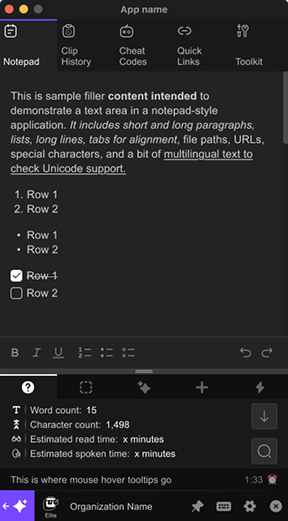
A fast, always-available scratchpad that lives inside Coolism. Open it with a keyboard shortcut, jot in markdown, and find it synced to your web portal when you need it later. Good for capturing mid-call ideas before they disappear.
Coolism keeps your last 500 clipboard entries, searchable, and right at your cursor via CoolMouse. The UTM you copied an hour ago is still there. The tagline from this morning is still there. Stop retracing your steps.
Coolism comes with fun cheat codes already built in. And you get other tools designed to speed up your working environment.
Try Coolism for free to discover what’s possible.
Most productivity tools are built for individuals. Coolism has an Organisation tier that lets you load cheat codes, quick links, and templates at the account level, so every team member gets the same setup from day one, on their own computer, without any manual sharing or file hunting.
In a digital marketing agency, that means things like:
A 5-person team saving 30 minutes a day is over 60 hours a month back in your business. That number grows with every person you add. And because Coolism is actually fun to use, your team will want to use it.
The bigger your team, the better the deal. Organisation pricing starts at US$9 per user per month for teams of 2 to 20, dropping to US$7 for larger groups. Sign up for Elite and follow the prompts to create your Organisation Account.
The average digital marketer spends 45 to 90 minutes every day on tasks Coolism eliminates. Repetitive typing. Tab hunting. Clipboard retracing. Context switching between tools that don’t talk to each other.
At a modest billable rate, that’s time you’re either writing off or absorbing as overhead. Coolism costs less per month than a single hour of your time. Most users recover that in the first day.
And if you’re agency-side, multiply that across your team. The drag isn’t personal, it’s structural. Coolism fixes it at the source.
TextExpander expands text. Coolism expands what your keyboard and mouse can do entirely. Text expansion is one feature inside Coolism. You also get a floating cursor toolbar, searchable clipboard history, embedded AI, URL launching, notes, and gamified usage tracking. They’re not the same category of tool.
Most users are running their first cheat codes within ten minutes of installing. You don’t need to configure everything at once. Start with the three things you retype most, and build from there. The setup time pays for itself on day one.
Most productivity tools require you to change how you work. Coolism sits inside your existing workflow. It doesn’t need a new tab, a new habit, or a new routine. Triple-tap Shift. Type a code. Keep going. The Coolness Score is there specifically to make the habit stick when novelty wears off.
Coolism runs on both Mac and PC. Whatever your setup, you’re covered from day one.
That’s what the Coolness Score is for. It tracks every minute you save, every time you use Coolism, from day one. You’ll know within the first week whether it’s paying off. If it isn’t, you haven’t lost much. If it is, you’ll have the data to prove it.
| With Coolism | Without Coolism | |
|---|---|---|
| Repetitive copy | Type a two-word code. Done in a second. | Open a doc, find the template, copy, reformat, paste. Every time. |
| Client URL access | One cheat code or CoolMouse tap from anywhere. | Five tabs open and you're still looking. |
| Clipboard | 500 entries, searchable, always at your cursor. | One item. Gone the moment you copy something else. |
| AI access | Right where you're working. No tab switching. | Open a new tab, re-explain the context, break your flow. |
| Reporting copy | Typed once, reused forever via cheat code. | Rewritten or hunted down every single time. |
| Context switching | Dramatically reduced. Tools come to your cursor. | Constant. Every tool lives somewhere different. |
| Habit formation | Coolness Score tracks your time saved, month by month. | You never really know how much you're losing. |