
Coolism helps anyone who uses a computer get more done, faster.

Coolism is fun Mac and PC software that helps you do more with fewer keystrokes and less mouse movement.


Try Coolism for Free
or keep scrolling to learn more Down

Do these common computer problems slow you down at work?

Repetitive typing over, and over, and over

You type the same things constantly. Your email sign-off. Your address. Your company details. Answers to questions you’ve answered a hundred times. Phrases, paragraphs, and blocks of text that never change but somehow have to be typed fresh every single time.

Copy and paste clipboard ‘juggling’

Your clipboard holds one thing at a time. So you copy something, go to paste it, and realise you’ve copied something else since. Back you go to find the original. Anyone who has ever bounced between two documents copying details across knows exactly how much time this quietly wastes.

Opening the same web pages, the long way

There’s a handful of pages and tools you open every day. The CRM. The timesheet. That one spreadsheet. And every time, it’s the same routine: open the browser, type the address or dig through bookmarks, wait, click. A ten-second trip you make thirty times a week.

The good news is, most of this is fixable.
Coolism solves these problems. And does more, too.

Coolism puts the text, images, links and other things you commonly use right where your mouse or keyboard cursor already is.

  • Stop typing the same stuff over and over.
    Save the text you type all the time and give each one a short code.  Type the code and the full text appears instantly, anywhere you’re working.
  • Stop losing what you copied.
    Your last 500 copied items are saved and searchable, so the thing you copied an hour ago is still there when you need it.
  • Stop taking ‘the long way’ to get to your web tools
    Save your most-used websites, browser-based tools and documents as short codes too. Simply type a cheat code and you’re there. No opening the browser first, no bookmark digging, no retyping addresses you visit every day.

This means fewer keystrokes, less mouse travel, and no more digging around for things you use every day.

Try for Free

Inside, you’ll get:

A text and image ‘replacement engine’ that saves you time

You’ll save the text you commonly type (and images you commonly insert) as ‘cheat codes’. This could be your email sign-off, your address, or an email or report template you send every week. Write it once, and you’ll never type it from scratch again, anywhere your cursor sits.

You can insert fun animated GIFs, too.

Smart tools that appear near your mouse with a keyboard shortcut

Enter a simple keyboard shortcut and a floating toolbar appears right where your cursor is. Your most-used tools come to you, not the other way around.

We call it CoolMouse, and it’s the biggest time-saver on the list.

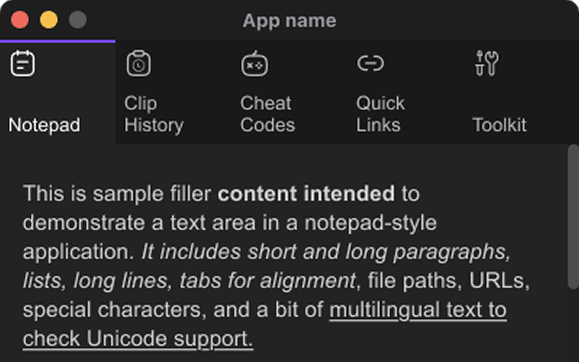
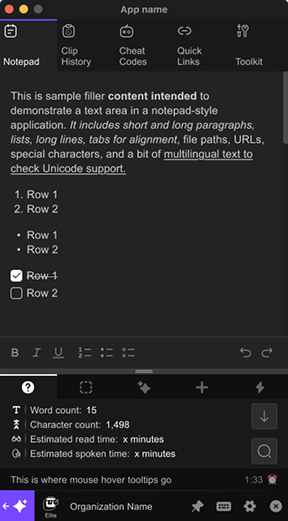
A responsive, fast notepad that’s only a quick click away

You’ll capture ideas the moment they arrive. Open it with a shortcut, jot your thought, and find it synced to your web portal later. Nothing gets lost between meetings.

A clipboard history that remembers (almost) everything

Coolism saves your last 500 copied items. They’re searchable, and right at your cursor. The link from an hour ago is still there. The address from this morning is still there. You’ll never retrace your steps again.

An AI assistant, and a “Coolness” Score

You’ll have an assistant built into Coolism, reachable from your cursor, a cheat code, or the app itself. Use it to draft an email, sharpen a sentence, or think something through. And Coolism’s “Coolness” Score shows you exactly how much time you’re getting back for the things you’d rather be doing.

And much more…

You’ll get 250+ fun emoji, text, animated GIF, and AI prompt cheat codes already built in, plus other tools including:

  • A fun “yes/no” decision maker
  • A countdown timer
  • A lorem ipsum generator
  • A hex code colour picker
  • And more…

Download and try Coolism for free to discover what’s possible.

Here are some example cheat codes
people love using every day

You type:
+gdone
Coolism inserts (rich text only):
You type:
utm1
Coolism inserts:
You type:
+gdis
Coolism inserts (rich text only):
You type:
disc1
Coolism inserts:

Your full agency disclaimer, correctly formatted, ready to paste into any deliverable.

You type:
+gapp
Coolism inserts (rich text only):
You type:
signoff1
Coolism inserts:

Your email sign-off block, name, title, agency, phone, and website, perfectly formatted every time.

You type:
+gbeer
Coolism inserts (rich text only):

The maths add up. Coolism saves time.

If you use a computer all day, you’re probably losing 30 to 60 minutes of it to things Coolism removes. Retyping the same text. Clicking through the same bookmarks. Hunting for something you copied an hour ago. And burning mental energy every time you switch between tasks and tools.

None of it feels like a big deal in the moment. But across a working week, it adds up to a real slice of your productive time. And because it happens so consistently, most people stop noticing it at all.

Coolism costs less per month than a single hour of most people’s time. If it saves you 20 minutes a day, it’s paid for itself before Wednesday.

Coolism is fun to use, too. 

Sure, I know what you're thinking

"I don't really type that much."

Cheat codes are the most visible feature, but they’re one of many. CoolMouse, clipboard history, QuickLinks and CoolAI are all useful no matter how much you type. If you switch between tools, lose clipboard items, or use AI in your work, Coolism has something for you.

"I don't have time to set it up."

Most people are running their first cheat codes within ten minutes of installing. You don’t need to configure everything at once. Start with the one thing you type most often and build from there. The setup pays for itself on day one.

"I've tried productivity tools before and stopped using them."

Most productivity tools ask you to change how you work. Coolism sits inside your existing workflow. No new tab, no new routine, no habit to build from scratch. Press a shortcut. Type a code. Keep going. And the Coolness Score is there to make it stick once the novelty wears off.

"It's one more subscription."

It is. And it costs less per month than most of the subscriptions already in your stack. If it saves you 20 minutes a day, it’s earned its place by Wednesday. If it doesn’t, you’ll know within the first week and you can cancel without drama.

"I'm on Windows."

Coolism runs on both Mac and PC. Whatever your setup, you’re covered from day one.

"I'm not sure I'll use it enough to justify the cost."

That’s exactly what the Coolness Score is for. It tracks every minute you save from day one, so you’ll know within the first week whether it’s paying off. Most people who make it past the first few days don’t cancel.

Coolism vs. No Coolism

  With Coolism Without Coolism
Typing the same thing again Type a short code. The full text appears instantly. Retype it, hunt down the old version, or start from scratch. Again.
Opening the tools you use every day One code or mouse click from anywhere. A different tab, bookmark, or manual entry every time.
Copying more than one thing Your last 500 copies, searchable, right at your cursor. One item. Gone the moment you copy something else.
Getting help from AI Right where you're working. No tab or app switching. Open a new tab (or change apps), re-explain the context, lose your place.
Staying focused through the day Less friction, more flow. Everything comes to your keyboard or mouse cursor. Constant small interruptions that quietly add up.
Context switching Dramatically reduced. Tools come to your cursor. Constant. Every tool lives somewhere different.
Habit formation Coolness Score tracks your time saved, month by month. You never really know how much you're losing.

Coolism is also designed for teams who want to win more, and chill more.

Most productivity tools are built for individuals. Coolism’s Organization management feature lets you load cheat codes and quick links at the team level, so everyone starts with the same setup from day one, on their own machine, without any manual sharing or lengthy onboarding.

For any team that works on computers all day, that means things like:

  • Shared templates and standard text snippets every team member pulls from the same source
  • Common browser-based tools, dashboards, and platforms accessible to everyone quickly
  • Consistent messaging and approved wording across every person who represents the business
  • Onboarding cheat codes that get a new team member productive from day one
  • One place to update copy and links when things change, instead of chasing it across shared drives and pinned docs

A 5-person team saving 30 minutes a day is over 60 hours a month back in your business. That number grows with every person you add. And because Coolism is actually fun to use, your team will want to use it.

The bigger your team, the better the deal. Organisation pricing starts at US$9 per user per month for teams of 2 to 20, dropping to US$7 for larger groups. Sign up for Elite and follow the prompts to create your Organisation Account.

Coolism is available on Mac and PC

And a mobile app is coming soon, too.

How much does Coolism cost, and is there a free version?

Yes, Coolism Free is free forever, and is a great way to trial Coolism with limited functionality. Coolism Elite is US$10/month or US$99/year and unlocks 1000 Cheat Codes, 500 Quick Links, 500 clipboard items, image and GIF insertion, and more.

Is Coolism worth it if I only need text expansion?

Yes, and you can start free. But text expansion is just one part of Coolism. The same tool gives you clipboard history, quick screenshots, instant URL launching, a cloud-synced notepad and built-in AI help, all triggered from wherever your cursor is. Most people come for the shortcuts and stay for everything else.

What makes Coolism different from other text expanders?

CoolMouse. Type a quick keyboard shortcut and a floating toolbar appears right at your cursor, giving you Cheat Codes, Quick Links, clipboard history, screenshots and AI without moving to a menu or switching apps. Other tools do text expansion; Coolism puts your whole shortcut toolkit wherever you’re already working.

How long does it take to set up Coolism?

Minutes. Coolism’s onboarding walks you through everything step by step, and it’s actually fun, so you’ll have your first Cheat Codes working before you finish the tour. Most people feel the time savings on day one.

Can I roll Coolism out to my whole team?

Yes. Sign up for Elite and create a Coolism Organisation to share Cheat Codes and Quick Links across your team. Pricing drops as you grow: US$79/user/year for 2 to 20 users, US$59 for 21 to 500, and custom pricing beyond that. A 10-person team pays $790 a year; if each person saves 30 minutes a day, that’s over 1,200 hours back annually.

Try for Free
Cancel or upgrade at any time.

💌 or send a reminder to 
my work email address.

Try Coolism for free.
Then upgrade to Elite for maximum efficiency.

  Coolism Free Coolism Elite
Type less, do more using Cheat Codes

3 Cheat Codes

500 Cheat Codes

Move less, access more with CoolMouse

Cheat Code Access Only

Full CoolMouse Access

Work smarter , think less using CoolAI

3 Prompts Per Day

300 Prompts Per Day

Navigate Faster Using Quick Links

3 Quick Links Only

500 Quick Links

Recall More Using Clip History

Prev. 3 Items

Prev 500 Items

Process information faster using Notepad

1,000 character limit

1,000,000 character limit

Device Access

1 Desktop Only

Two Desktops
(Mobile coming soon)

Toolkit Access

Coolism Score

Upgrade To Organisation Account

Access your information via a web portal

Free Forever

$10 per month,
$99 per year

  Try for Free
Cancel or upgrade at any time.
Get Coolism Elite
Cancel or downgrade at any time.

Your team will love being a Coolism Organization.

Cut admin overhead, and boost morale.

With a Coolism Organization, you become the admin. You build the cheat code library, set up quick links, and roll it out to your team in minutes. Every person you invite gets full Elite access, plus instant access to the shortcuts you create, on top of their own. And you handle the billing in one place, for everyone.

The more people on your team, the more the time savings compound.
And the less it costs per person.

The bigger your team, the better the deal.

Organisation Pricing:
  Individual/Solo 2-20 Users In
An Organisation
21-500 Users In
An Organisation
501+ Users
Per Month US$10 US$9 US$7 Contact
Per Year US$99 US$79 US$59 Contact

A 10-person team on the annual plan costs $790 for the year. If each person saves just 30 minutes a day, that’s over 1,200 hours back in your business annually. That’s 30 full working weeks.

And because Coolism is actually fun to use, your team will want to use it. Less repetitive grunt work, more time for the stuff that matters. That’s a pretty good deal for morale, too.

To create an Organisation Account, sign up for Elite and follow the prompts.

Keyboard